MikroTrick: what happened to MikroTik routers in September, and how to check and harden yours
Two SSH bugs let attackers take over MikroTik routers without a password. What happened, which RouterOS version to run now, and a step-by-step check and hardening guide.
Short version: if a MikroTik router has SSH, WebFig or WinBox reachable from the internet and has not been updated since August, treat it as possibly compromised. Update to RouterOS 7.25 stable or 7.23.8 long-term, check the router with the steps below, and stop exposing management ports. Use a VPN instead.
What happened
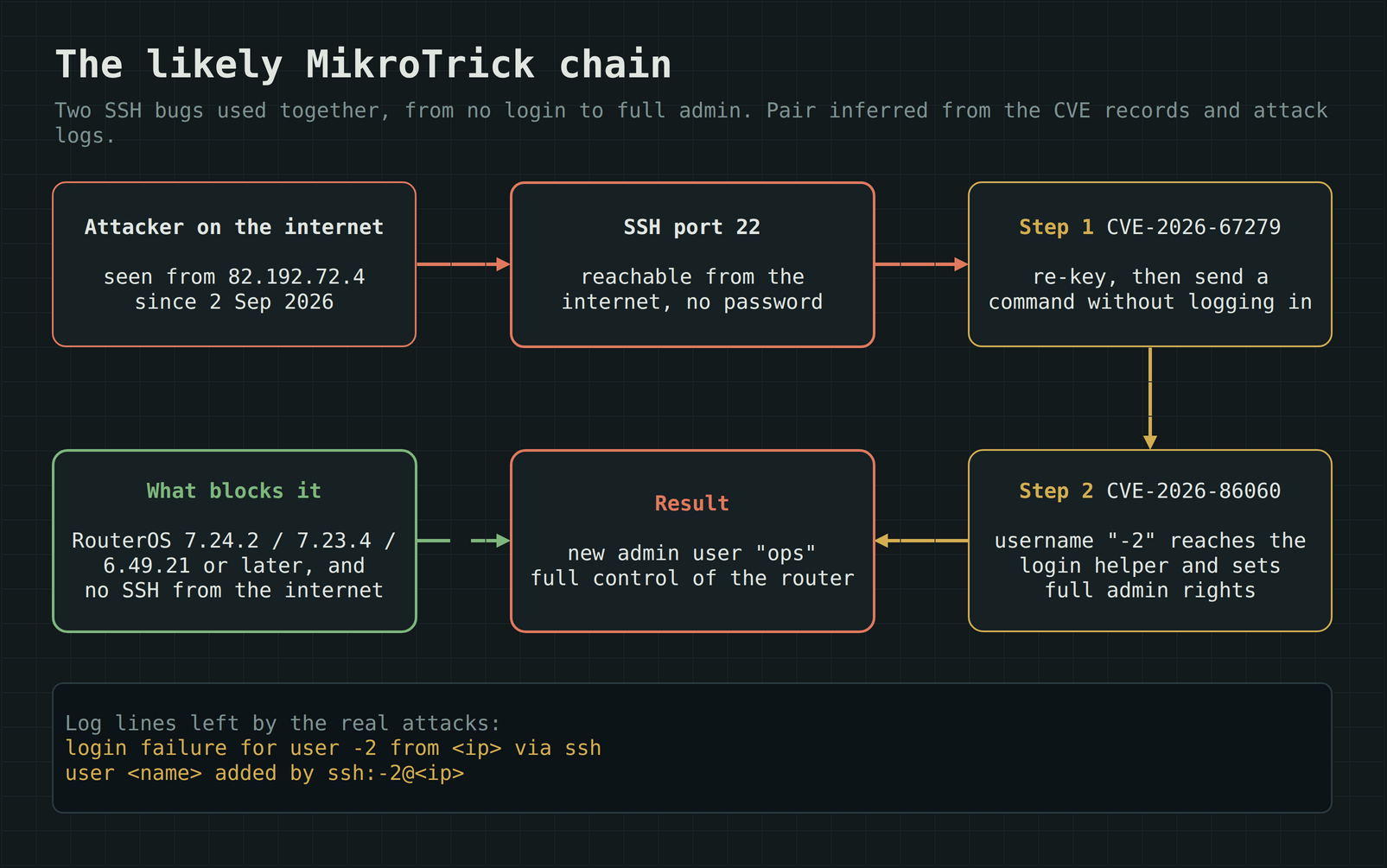
On 3 September 2026 MikroTik released RouterOS 7.24.2 (stable), 7.23.4 (long-term) and 6.49.21 (RouterOS 6) on the same day. The notes called them an "important security update" and gave no details. Two days later, on 5 September, CERT Polska explained why. Its researchers had found six bugs in RouterOS. Two of them, used together, let an attacker take full control of a router over SSH without a password. CERT Polska named the chain MikroTrick.
The attacks were real. CERT Polska saw successful break-ins from at least 2 September, against routers whose SSH service was open to the internet. In those attacks the intruders created a highly privileged user called ops. The Dutch NCSC published an advisory on 8 September, and DIVD, a volunteer security group, began scanning for exposed routers on 17 September and warning their owners.
With the update, MikroTik also sent a push notification to every phone with the MikroTik app installed. According to CERT Polska, it was the first time the company had done so.
Sławomir Rozbicki of CERT Polska found the bugs using OpenAI models (GPT-5.5-cyber and GPT-5.6-sol) in an isolated lab. CERT Polska is clear about the split of work: the models sped up the search, while the researchers designed the lab, confirmed every finding on real RouterOS systems and ruled out false results.
The six bugs in plain English
| CVE | Where | What an attacker could do | CVSS v4 |
|---|---|---|---|
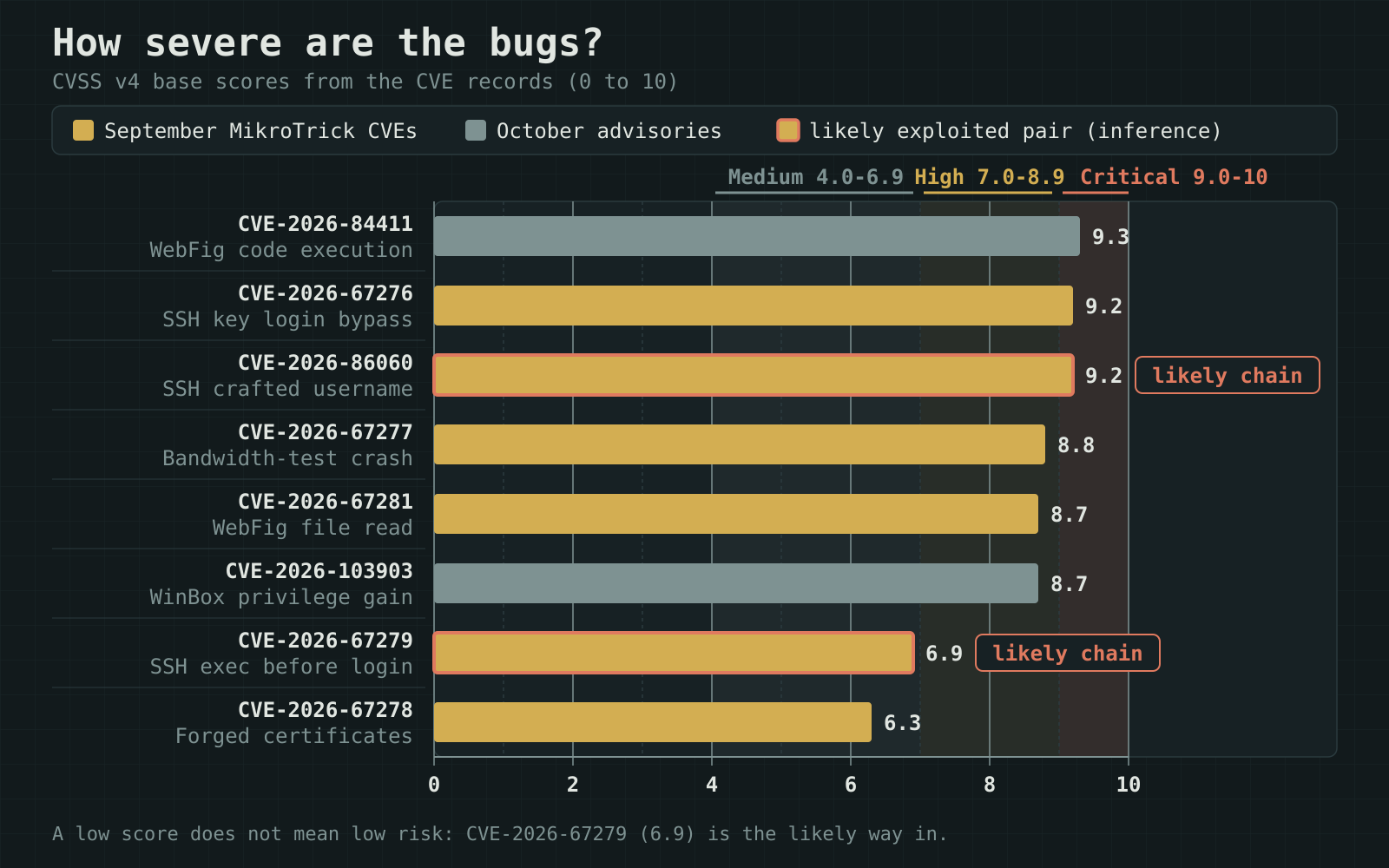
| CVE-2026-67279 | SSH | Ask to re-key the connection and send a command without ever logging in | 6.9 |
| CVE-2026-86060 | SSH | Use a username that starts with a forbidden character to give the session full admin rights | 9.2 |
| CVE-2026-67276 | SSH | Log in as a user without their private key, if they know that user's RSA public key (RouterOS 7.9 and later) | 9.2 |
| CVE-2026-67281 | WebFig | Read files from the router, including stored credentials, without logging in (RouterOS 7.20 and later) | 8.7 |
| CVE-2026-67278 | Certificates | Pose as a server the router connects to, using a forged certificate or SSH host key (RouterOS 7 only) | 6.3 |
| CVE-2026-67277 | Bandwidth test | Crash the router or leak small pieces of its memory | 8.8 |
CERT Polska has not said which two bugs make up the chain. The most likely pair is the first two in the table: get an SSH session without logging in, then use a crafted username to raise that session to full admin. The CVE-2026-86060 record says the attack "requires an unauthenticated SSH session to reach the RouterOS login helper", and CVE-2026-67279 provides exactly that. The username -2 in the attack logs also fits. This is my reading of the public records, not an official statement.
It didn't end in September
Three things make this more than a "just update" story.
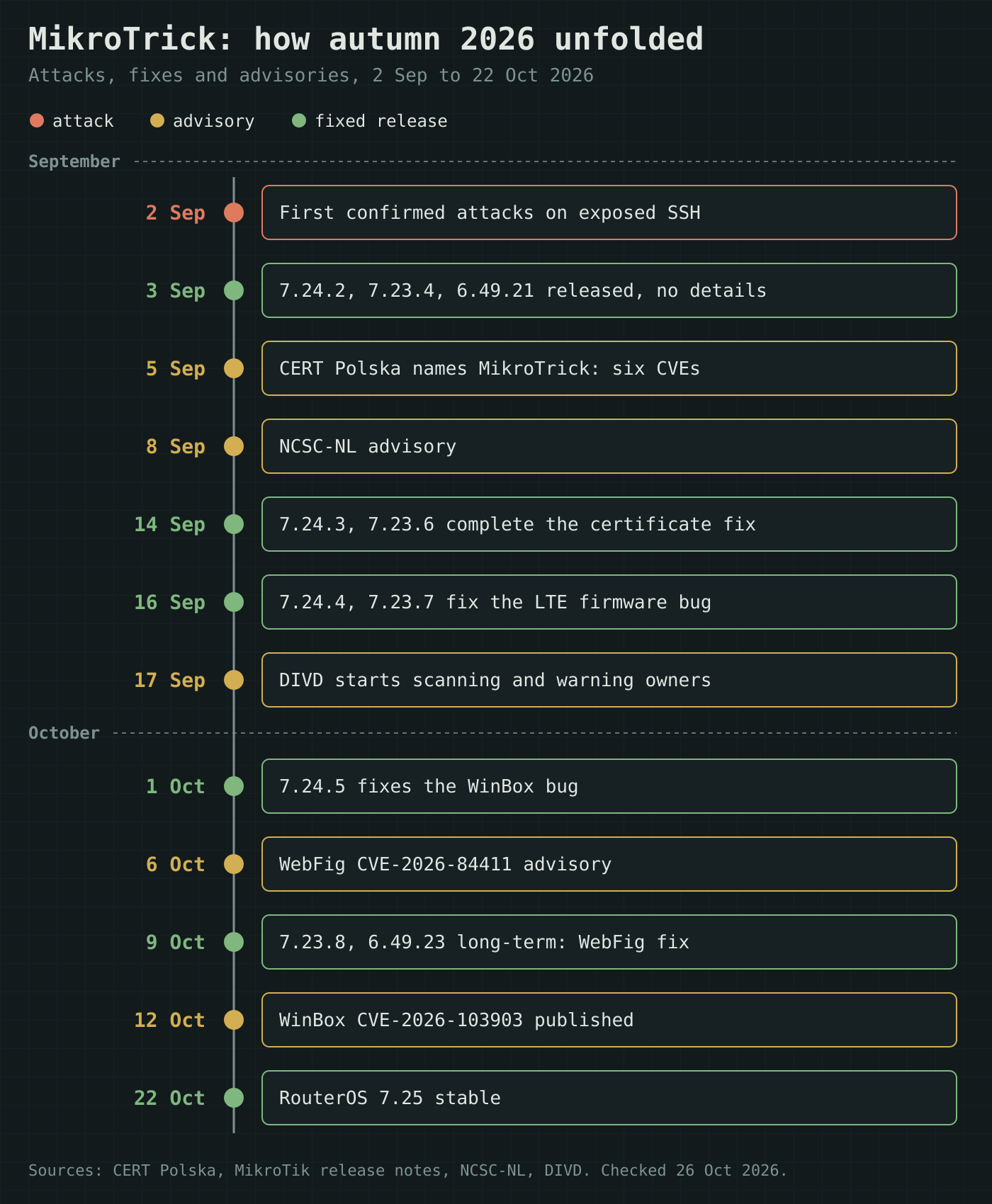
1. The first fix was incomplete. The certificate fix (CVE-2026-67278) in 7.24.2 and 7.23.4 did not fully work. The complete fix is in 7.24.3 and 7.23.6, released on 14 September. If you updated in the first week of September, update again.
2. The fix releases broke some LTE routers. On some SXT LTE models and LTE kits for KNOT and SXTsq boards, 7.24.3 and 7.23.6 deleted the modem firmware. MikroTik fixed this in 7.24.4 and 7.23.7 on 16 September. If your LTE link died after updating, upgrade again, then run:
/interface/lte/firmware-upgrade [find] upgrade=yes
Reboot afterwards. The 7.24.4 release notes list the affected models.
3. More advisories arrived in October. The two that matter most:
- CVE-2026-84411 (WebFig, CVSS v4 9.3): one crafted web request, sent without logging in, can crash the web service or run code on the router with full rights. It is fixed in 7.24 stable, 7.23.8 long-term and 6.49.23 for RouterOS 6. MikroTik's advisory page still said "release pending" for the long-term branches on 26 October, but the 7.23.8 and 6.49.23 release notes, both from 9 October, list the fix.
- CVE-2026-103903 (WinBox, CVSS v4 8.7): any user allowed to log in with WinBox, even a read-only one, can take on the rights of another account on the router, such as an admin. It is fixed in 7.24.5, 7.25 and 7.23.8.
There were smaller ones too: a crash in the SNMP service that the default public community can trigger (fixed in 7.24 and 7.23.3), a container-image bug that MikroTik will not fix on the 7.23 long-term branch, and weak rate limiting on API logins.
Which version should you run?
As of 26 October 2026:
| Branch | Latest | My advice |
|---|---|---|
| Stable | 7.25 (22 Oct) | Use this. It includes every fix above. |
| Stable, previous | 7.24.5 (1 Oct) | Fine if you can't move to 7.25 yet. |
| Long-term | 7.23.8 (9 Oct) | Fixes MikroTrick, the WebFig bug and the WinBox bug. The container fix will not come to this branch, so run 7.25 if you use containers. |
| RouterOS 6 | 6.49.23 (9 Oct) | Fixes the MikroTrick bugs that apply to v6 and the WebFig bug. Plan the move to v7. |
If you are on 7.23.7 or 6.49.22, you are not fully patched: both are missing the October WebFig fix.
The guide: check, update and harden a MikroTik
Run these in a terminal (WinBox → New Terminal, or SSH from inside your network). Before you change firewall rules or services, press Ctrl+X to turn on Safe Mode. If you lock yourself out, RouterOS undoes your changes when the session drops.
Step 1: save the evidence first
By default, logs are kept in memory and are lost on reboot, and an upgrade reboots the router. Save them first:
/log/print file=pre-upgrade-log
/export show-sensitive file=pre-upgrade-config
Download both files (WinBox → Files) and keep them off the router. The export includes passwords and keys, so store it somewhere safe.
Step 2: look for the known signs of attack
CERT Polska published these markers from the real attacks:
/log/print where message~"user -2"
/log/print where message~"ssh:-2"
/user/print where name="ops"
The log lines to look for are:
login failure for user -2 from <ip> via ssh
user <name> added by ssh:-2@<ip>
Also look for a highly privileged user called ops. The successful attacks came from 82.192.72.4, with further attempts from 103.102.31.18.
If you find any of these, stop here and go to Step 6. Finding none does not prove the router is clean. It only rules out the traces we know about.
Step 3: update RouterOS
/system/package/update/set channel=stable
/system/package/update/check-for-updates
/system/package/update/install
The router reboots. Use channel=long-term instead if you stay on the long-term branch. When the router is back, update the boot firmware to match, then reboot again:
/system/routerboard/upgrade
/system/reboot
Step 4: check whether RouterOS flagged the router
The fixed releases scan the configuration at startup for known signs of a break-in. If they find any, they disable the suspicious entries, write a critical log message and mark the router as flagged.
/system/device-mode/print
/log/print where topics~"critical"
If you see flagged: yes, treat the router as compromised and go to Step 6. A flagged router keeps routing traffic but blocks bandwidth-test, the traffic generator and the sniffer. It also refuses to create or enable entries in the scheduler, SOCKS, PPTP, L2TP, IPsec, proxy and SMB.
Even with flagged: no, read through these for anything you didn't add yourself:
/user/print detail
/user/ssh-keys/print
/user/active/print
/system/script/print detail
/system/scheduler/print detail
/ip/socks/print
/ip/proxy/print
/ip/firewall/nat/print
/ip/dns/static/print
/interface/print
/file/print
Look for unknown users, scripts, scheduled tasks, SOCKS or web proxies, NAT rules that point somewhere unexpected, and tunnel interfaces. Those are the places CERT Polska told administrators to check.
Step 5: close the doors
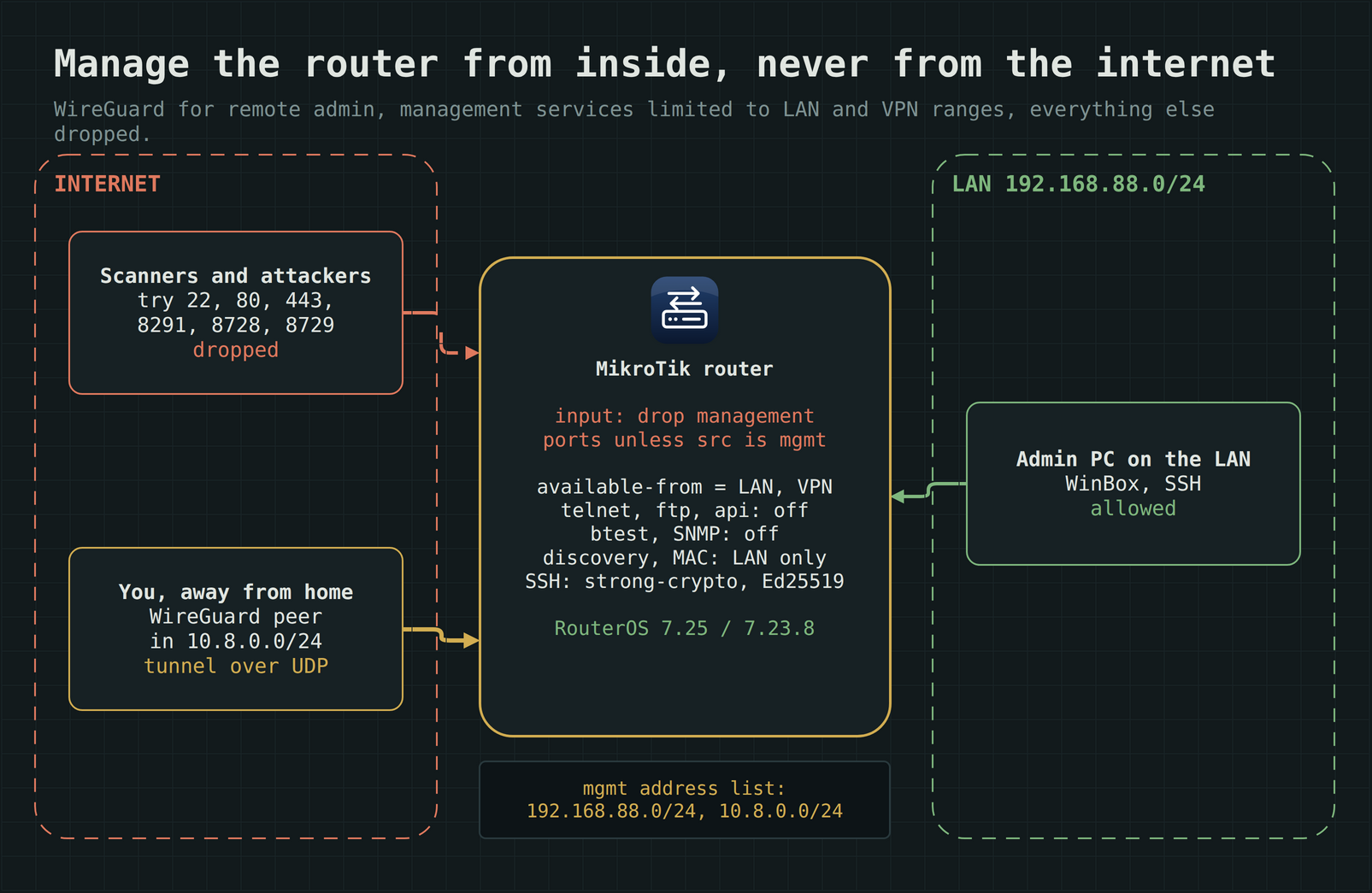
The single most useful change is this: don't expose any management service to the internet. Reach the router over WireGuard (or MikroTik's Back To Home VPN) and manage it from inside.
Turn off services you don't use:
/ip/service/disable telnet,ftp,api,api-ssl
/tool/bandwidth-server/set enabled=no
/snmp/set enabled=no
If you don't use the web interface, turn it off too:
/ip/service/disable www,www-ssl
Limit the services you keep to your LAN and VPN ranges. Change the example addresses to your own, and make sure the address you are working from is in the list:
/ip/service/set ssh,winbox available-from=192.168.88.0/24,10.8.0.0/24
Before 7.24 the parameter was called address=. The old name still works on newer versions.
This setting alone does not hide the port. The router still accepts the connection and then closes it, so a port scan still finds it open. To hide it, drop the traffic in the firewall as well:
/ip/firewall/address-list/add list=mgmt address=192.168.88.0/24
/ip/firewall/address-list/add list=mgmt address=10.8.0.0/24
/ip/firewall/filter/add chain=input protocol=tcp dst-port=22,80,443,8291,8728,8729 src-address-list=!mgmt action=drop comment="Drop management from outside" place-before=0
If the input chain has no rules yet, leave out place-before=0. The default MikroTik configuration already drops input from the WAN, so check you haven't weakened it:
/ip/firewall/filter/print where chain=input
Stop the router announcing itself on the WAN, and limit MAC-based access to the LAN. This uses the LAN interface list from the default configuration:
/ip/neighbor/discovery-settings/set discover-interface-list=LAN
/tool/mac-server/set allowed-interface-list=LAN
/tool/mac-server/mac-winbox/set allowed-interface-list=LAN
Use stronger SSH settings and an Ed25519 host key. Update your SSH client's known_hosts afterwards. RouterOS 7.25 makes Ed25519 the default host key type:
/ip/ssh/set strong-crypto=yes host-key-type=ed25519
/ip/ssh/regenerate-host-key
Clean up users. Remove accounts nobody uses and give each person their own account. Keep the number of accounts with WinBox access small, because on unpatched versions CVE-2026-103903 turns any WinBox login into a possible admin login.
If you run more than one CA on the router (for example one for OpenVPN and one for CAPsMAN), set each service to trust only its own CA. The option has been available since 7.21 (CVE-2025-42611), and upgrading alone does not turn it on.
Step 6: if the router was compromised
This follows the advice from CERT Polska and MikroTik:
- Disconnect the router from the network.
- Save the logs and configuration (Step 1) before you reset anything. Report the incident to your national CSIRT.
- Don't clear the flagged status until the evidence is saved and checked.
- Reset to factory settings. I would go further and reinstall with Netinstall, so nothing left on the flash survives. Then rebuild from a known-good configuration. Don't restore a full backup taken from the compromised router.
- Change every password, key and secret that was on the router, including VPN keys, Wi-Fi passwords and API tokens.
- Only then clear the flag. Run
/system/device-mode/update flagged=noand confirm with a button press or by unplugging the power. A normal reboot cancels the change.
Checklist
- [ ] Logs and configuration exported and stored off the router
- [ ] No
user -2log lines, noopsuser, no unknown users, scripts or scheduled tasks - [ ] RouterOS on 7.25 (or 7.24.5 or later), or 7.23.8 long-term, and boot firmware upgraded
- [ ]
/system/device-mode/printshowsflagged: no - [ ] SSH, WebFig, WinBox and API not reachable from the internet; management only over a VPN
- [ ] Telnet, FTP, API, bandwidth-test and SNMP off unless needed
- [ ] Neighbour discovery and MAC access limited to the LAN
- [ ] SSH set to strong crypto with an Ed25519 host key
- [ ] Unused accounts removed and WinBox access kept to a few people
What I took from this
Every attack CERT Polska confirmed hit a router with SSH open to the internet. The fix was out a day after the first confirmed attack, but by then some routers had already been taken over, so patching fast was not enough on its own. Keeping SSH off the internet would have stopped this chain completely. Use a VPN, keep the router updated, and watch the stable channel when advisories come out. Both October bugs were fixed on stable first: the WebFig fix in 7.24 in August and the WinBox fix in 7.24.5 on 1 October. The long-term release with both fixes came on 9 October.
Sources
- MikroTik, September 2026 vulnerability (3 Sep, updated 6 Oct 2026) and the security announcements page
- CERT Polska, Critical vulnerabilities in MikroTik RouterOS are being actively exploited and the CVE table (5 Sep 2026)
- CERT Polska, MikroTik: securing logs and configuration (in Polish)
- CVE records on cve.org: CVE-2026-67276, -67277, -67278, -67279, -67281, -86060, -84411 and -103903
- NCSC-NL, NCSC-2026-0345 (8 Sep 2026); DIVD, DIVD-2026-00012
- MikroTik release notes for 7.24.3, 7.24.4, 7.24.5, 7.23.6, 7.23.7, 7.23.8, 6.49.22, 6.49.23 and 7.25 on the MikroTik forum
- MikroTik manual: Device-mode and Flagged status, Services,
/ip/ssh
All sources read on 26 October 2026. Version advice covers releases up to that date.