MikroTik Dual-WAN Failover with Recursive Routes and Netwatch
Your ISP's modem can stay up while the internet behind it is dead. Recursive routes test a path through the ISP, so the router switches lines when that path fails.
The usual dual-WAN setup is two default routes with different distances and check-gateway=ping turned on. It catches the modem dying. It misses the case where the modem is fine and answers pings all day, but the ISP behind it has stopped passing traffic.
On a line that drops a few times a week, that is the failure you hit most. This note sets up failover that tests a path through the ISP, not the modem.
Written for RouterOS 7.x. The commands use documentation addresses (192.0.2.0/24 and 198.51.100.0/24). Swap in your own.
The setup
- WAN1 (primary, fibre):
ether1, gateway192.0.2.1 - WAN2 (backup, LTE or second ISP):
ether2, gateway198.51.100.1 - LAN:
bridge,10.0.10.0/24
Why a plain check-gateway is not enough
check-gateway=ping pings the gateway address on the route. On a normal setup that gateway is the modem or the ISP's first router, one hop away. If the ISP's upstream fails, the modem still answers, the route stays active and your traffic goes nowhere.
The fix is to make the router ping something far away, through a specific WAN, and only use that WAN while the far-away thing answers.
How recursive routing works
You give each WAN a "probe host": a public IP that is only reachable through that WAN. Then the default route does not point at the modem. It points at the probe host. RouterOS resolves that gateway recursively, through the pinned route, down to the real next hop.
When check-gateway=ping runs on that default route, it pings the probe host across the internet. If the ISP path breaks, the ping fails and the route goes inactive. The backup takes over.
Pick probe hosts that:
- Answer ICMP reliably (large anycast resolvers are good).
- Are not your DNS servers. Once a host is pinned to WAN1, you can't reach it through WAN2, so using it for DNS would break DNS during a failover.
This note uses 1.0.0.1 (Cloudflare's secondary) for WAN1 and 149.112.112.112 (Quad9's secondary) for WAN2. Keep 1.1.1.1 and 9.9.9.9 for DNS.
Step 1: Pin each probe host to its WAN
/ip route
add dst-address=1.0.0.1/32 gateway=192.0.2.1 scope=10 comment="probe WAN1"
add dst-address=149.112.112.112/32 gateway=198.51.100.1 scope=10 comment="probe WAN2"
Add blackhole routes behind them. If WAN1's link goes down completely, its probe route disappears. Without a blackhole, traffic to 1.0.0.1 would then leak out through WAN2, the probe would succeed, and the router would think WAN1 was healthy.
/ip route
add dst-address=1.0.0.1/32 blackhole distance=254 comment="probe WAN1 guard"
add dst-address=149.112.112.112/32 blackhole distance=254 comment="probe WAN2 guard"
Step 2: Default routes through the probe hosts
/ip route
add dst-address=0.0.0.0/0 gateway=1.0.0.1 target-scope=11 check-gateway=ping distance=1 comment="default via WAN1"
add dst-address=0.0.0.0/0 gateway=149.112.112.112 target-scope=11 check-gateway=ping distance=2 comment="default via WAN2"
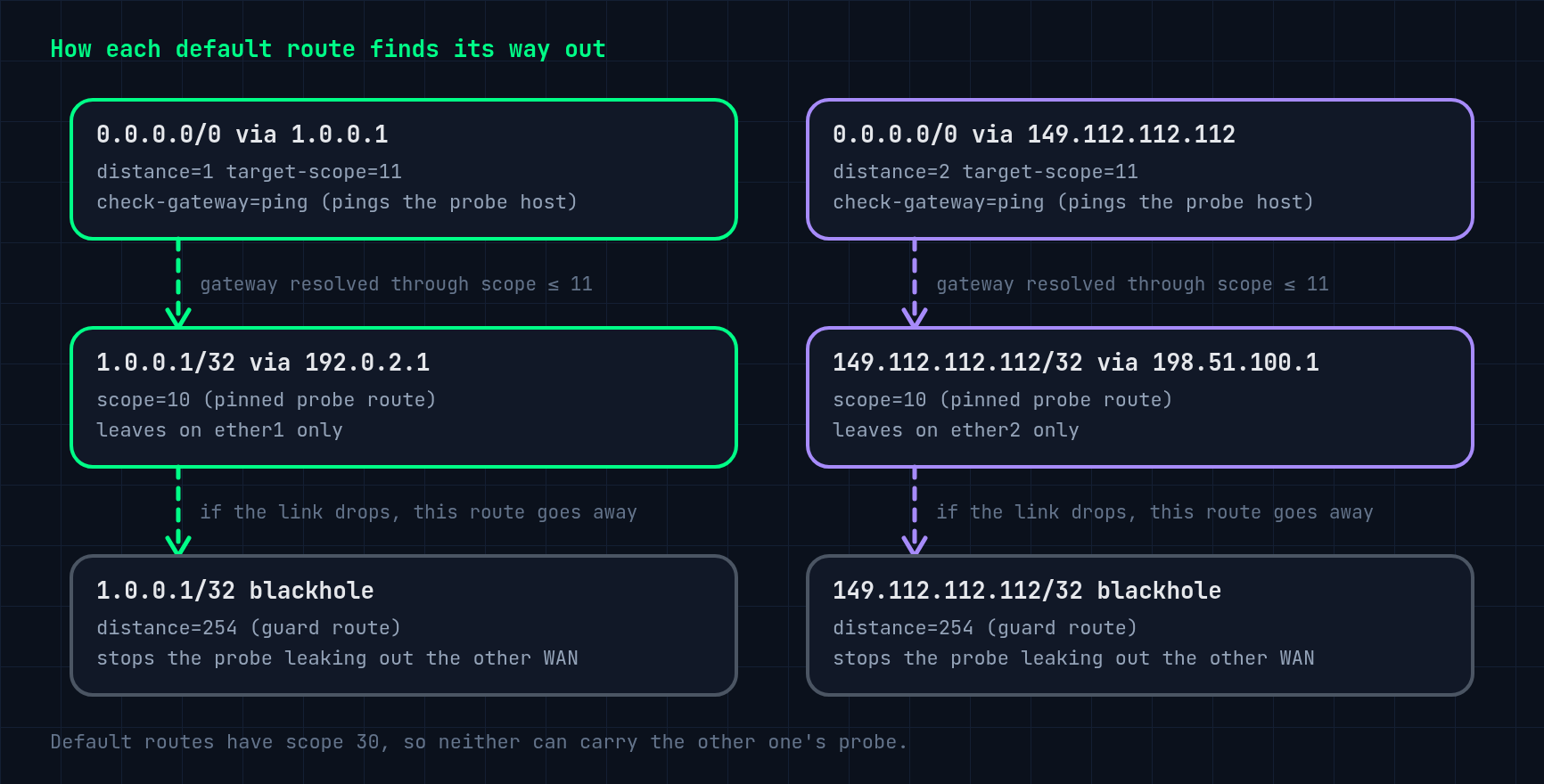
What the numbers do:
scope=10on the probe routes andtarget-scope=11on the default routes let RouterOS resolve the gateway through the probe route. The target scope must be higher than the scope of the route it resolves through.- Default routes have scope 30, which is higher than 11. So a default route can never be used to resolve the other default route's gateway. That is what stops WAN1's check leaking out through WAN2.
distance=1makes WAN1 primary. WAN2 sits ready atdistance=2.
check-gateway=ping sends a ping every 10 seconds and marks the route down after two failures. Expect failover within about 20 seconds of the line dying.
Step 3: NAT for both WANs
/ip firewall nat
add chain=srcnat out-interface=ether1 action=masquerade comment="NAT WAN1"
add chain=srcnat out-interface=ether2 action=masquerade comment="NAT WAN2"
Step 4: If a WAN uses DHCP or PPPoE
A DHCP gateway can change, which would break the static probe route. Stop the DHCP client adding its own default route, and let its script update the probe route instead:
/ip dhcp-client
set [find interface=ether1] add-default-route=no script={
  :if ($bound=1) do={
    /ip route set [find comment="probe WAN1"] gateway=$"gateway-address"
  }
}
For PPPoE, use the interface as the gateway on the probe route (gateway=pppoe-out1) and set add-default-route=no on the PPPoE client.
Step 5: Keep incoming traffic on the line it came in on
If you forward ports or reach the router remotely on WAN2's address, the replies must leave through WAN2. Otherwise they go out WAN1 with the wrong source address and the connection fails. Mark those connections and give them their own routing table:
/routing table
add name=via-wan2 fib

/ip firewall mangle
add chain=prerouting in-interface=ether2 connection-state=new action=mark-connection new-connection-mark=in-wan2 passthrough=yes
add chain=prerouting connection-mark=in-wan2 in-interface=bridge action=mark-routing new-routing-mark=via-wan2 passthrough=no
add chain=output connection-mark=in-wan2 action=mark-routing new-routing-mark=via-wan2 passthrough=no

/ip route
add dst-address=0.0.0.0/0 gateway=198.51.100.1 routing-table=via-wan2 comment="replies for WAN2"
If your firewall has the default FastTrack rule, marked connections skip mangle and the replies still leave through WAN1. Exclude them from FastTrack:
/ip firewall filter
set [find action=fasttrack-connection] connection-mark=no-mark
Skip this step if nothing connects in to the backup line.
Step 6: Netwatch for alerts
The routes already handle failover. Netwatch tells you it happened. It pings each probe host and runs a script when the state changes:
/tool netwatch
add host=1.0.0.1 type=icmp interval=10s timeout=2s comment="WAN1 health" \
  down-script=":log warning \"WAN1 down, traffic on WAN2\"" \
  up-script=":log info \"WAN1 back, traffic returning\""
add host=149.112.112.112 type=icmp interval=10s timeout=2s comment="WAN2 health" \
  down-script=":log warning \"WAN2 (backup) down\"" \
  up-script=":log info \"WAN2 (backup) back\""
Because the probe hosts are pinned, each netwatch entry tests exactly one line. You can replace the log lines with a /tool fetch call to a webhook or a Telegram bot. When WAN1 is down, that call goes out over WAN2, so the alert still gets through.
Testing it without unplugging anything
Simulate a dead ISP on WAN1 by dropping the router's own pings to WAN1's probe host:
/ip firewall filter
add chain=output dst-address=1.0.0.1 protocol=icmp action=drop comment="TEST WAN1 fail"
Wait 30 seconds, then check which default route is active:
/ip route print where dst-address=0.0.0.0/0
The WAN2 route should now carry the A (active) flag. Check the log for the netwatch warning. Then remove the test rule:
/ip firewall filter remove [find comment="TEST WAN1 fail"]
Within 30 seconds, run the print command again. The WAN1 route should be active again.
Things to know
- Existing connections don't move. Open connections on WAN1 keep their NAT state and stall until they time out or the app reconnects. Expect a video call to drop and reconnect. That is how masquerade NAT behaves.
- One probe host per line is a single point of failure. If Cloudflare stops answering ICMP from your ISP, WAN1 is marked down while it still works. If you see false failovers, add a second probe host per WAN with its own pinned route and default route.
- There is no hold-down timer. A line that flaps will pull traffic back and forth every time it recovers. If yours does that, raise the primary's distance from a netwatch script and lower it only after the line has been stable for a few minutes.
- The backup costs money if it's metered. Watch LTE data use. Phone backups and cloud sync can use up a data bundle during a long outage.
Checklist
- Pin one probe host to each WAN with
scope=10, plus a blackhole route behind it. - Point each default route at its probe host with
target-scope=11andcheck-gateway=ping. - Add masquerade for both WANs.
- On DHCP or PPPoE WANs, turn off the client's default route and keep the probe route's gateway current.
- If anything connects in on WAN2, add the connection marks and the
via-wan2table, and keep marked connections out of FastTrack. - Add netwatch entries for alerts.
- Run the firewall-rule test before you rely on it.